
Web Frontend
repartee includes a built-in web frontend that runs alongside the terminal UI. Access your IRC sessions from any browser -- desktop or mobile -- with real-time bidirectional sync.
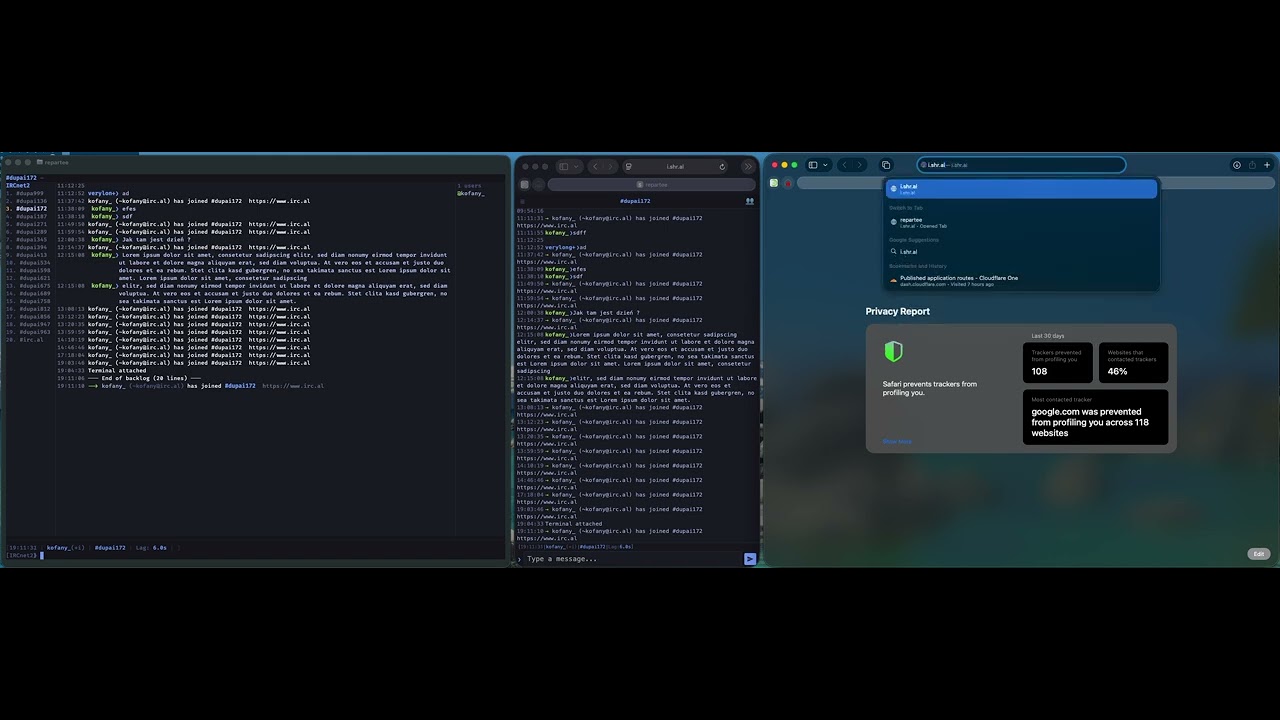
TUI (left) | Mobile web (center) | Desktop web (right) -- 1:1 state sync.
Enabling
The web frontend is disabled by default. To enable it, set a password in ~/.repartee/.env and enable it in config.toml:
1. Set the login password:
echo 'WEB_PASSWORD=your-secret-password' >> ~/.repartee/.env
2. Enable in config:
[web]
enabled = true
port = 8443
repartee auto-generates a self-signed TLS certificate on first launch. Open https://localhost:8443 in your browser and accept the certificate warning.
Configuration
All web settings live under the [web] section in config.toml and can be changed at runtime with /set:
| Setting | Default | Description |
|---|---|---|
web.enabled | false | Enable the web server |
web.bind_address | 127.0.0.1 | Bind address (use 0.0.0.0 for LAN access) |
web.port | 8443 | HTTPS port |
web.tls_cert | (auto) | Path to TLS certificate (PEM). Empty = self-signed |
web.tls_key | (auto) | Path to TLS private key (PEM). Empty = self-signed |
web.password | (from .env) | Login password (set via WEB_PASSWORD in .env) |
web.session_days | 90 | Cookie lifetime in days; sessions persist to disk and survive browser restart |
web.username | repartee | Username pre-filled in the login form (decorative — only the password is checked) |
web.image_previews | false | Opt-in inline image previews under chat messages |
web.image_previews_max_per_msg | 4 | Max preview thumbnails rendered per message |
web.thumbnail_cache_mb | 200 | Max size of ~/.repartee/web_thumbnails/ (LRU by mtime) |
web.theme | nightfall | Default theme (nightfall, catppuccin-mocha, tokyo-storm, gruvbox-light, catppuccin-latte) |
web.timestamp_format | %H:%M | Timestamp format (chrono strftime syntax) |
web.line_height | 1.35 | CSS line-height for chat messages |
web.nick_column_width | 12 | Nick column width in characters |
web.nick_max_length | 9 | Max nick display length before truncation |
Nick coloring settings live under [display] but are also synced to web clients:
| Setting | Default | Description |
|---|---|---|
display.nick_colors | true | Enable per-nick deterministic coloring |
display.nick_colors_in_nicklist | true | Also color nicks in the nick list sidebar |
display.nick_color_saturation | 0.65 | HSL saturation (0.0-1.0) |
display.nick_color_lightness | 0.65 | HSL lightness (0.0-1.0), lower for light themes |
Settings changed via /set web.* or /set display.nick_color* apply immediately to all connected web clients.
Features
The web frontend provides full 1:1 parity with the terminal UI:
- All buffer types -- server, channel, query, DCC chat
- Real-time sync -- messages, nick changes, joins, parts, quits, topic changes, mode changes
- Bidirectional buffer switching -- switch a buffer on web and the TUI follows, and vice versa
- Command execution -- run any
/commandfrom the web input (output visible on web) - Tab completion -- nicks,
/commands, and/setsetting paths - Completion popup -- typing
@nick,/cmdor:emoteopens a tap-friendly suggestion list (emotes show animated thumbnails). Arrow keys move the selection, Tab accepts, Escape closes; Enter only accepts when a row is selected, so it otherwise still sends. Tapping a row commits onmousedown, so accepting a suggestion doesn't dismiss the mobile keyboard - Tap a nick to mention it -- tapping a nick in the chat log inserts it into the composer (
nick:at the start of a line,nickmid-line); a double-click still selects the text for copying instead. Tapping a nick in the nick list opens a query, as before @nickrewritten on send -- a line starting with@nickis sent as IRC's conventionalnick:addressing form, with the canonical casing from the nick list. If the name doesn't match anyone in the buffer the line is sent untouched, and a mid-line@nickis never rewritten- Input history -- press ↑/↓ to recall what you sent, like the TUI (last 100 entries; your unsent draft is stashed and restored). ↑ only steps back when the caret is on the draft's first line, so it still moves normally inside a multi-line draft
- Typing indicators -- see who is composing a message in the current buffer, matching the TUI status line (
alice and bob are typing…). Your own typing is reported while you compose, subject to the[typing]send switches - Nick coloring -- deterministic per-nick colors synced from server settings, same HSL algorithm as TUI
- Nick list -- grouped by mode (ops, voiced, regular), away status, per-nick coloring (toggleable separately)
- Activity indicators -- color-coded activity levels, plus an unread badge on each buffer (capped at
99+, hidden for the active buffer). Buffers on a disconnected network are dimmed - Adjustable text size & line spacing -- an Aa menu (bottom bar on desktop, slide-out panel on mobile) sets font size (10–24 px) and line spacing (1.00–2.20), with a reset to defaults. Both persist in
localStorage, so they survive a reload - Mentions -- highlight tracking with mention count badge
- Theme picker -- switch themes live (5 built-in themes)
- Multiline input -- compose with line breaks or paste a block; sent as one
draft/multilinemessage when the server supports it, otherwise line-by-line - Persistent sessions -- 90-day default cookie, file-backed token store; browser restart, PWA install, and WiFi-to-cellular handoff don't log you out
- Login form with username -- proper
<form>with separate username + password inputs so 1Password, iCloud Keychain, and Bitwarden recognise the form - Clickable links -- URLs in messages render as links that open in a new tab, with the browser's native right-click context menu ("Open in New Window", "Copy Link Address")
- Image previews -- opt-in (
web.image_previews = true); server-side SSRF-guarded fetch + thumbnail (400x300 JPEG, cached locally), reserved layout box so async loads don't reflow chat, per-message dismiss persisted in localStorage - Auto-reconnect -- WebSocket automatically reconnects with exponential backoff (2s-30s) on connection loss
- Resilient initial connect -- a transient network blip on page load retries up to five times with backoff before falling back to the login form
- Date separators -- visual separators between messages from different days for easier history reading
- Embedded shell -- full terminal in the browser via beamterm 1.0 WebGL2 renderer. Opens in the initiating browser tab with a separate PTY per web session (no resize fighting with TUI). FiraCode Nerd Font, wide-glyph 2-column rendering, mouse selection with clipboard, Ctrl+/- font resize, Ctrl+C (SIGINT), clipboard paste with bracketed paste mode
- Inline emotes -- 183 built-in GG7
:name:emotes render as inline animated GIFs served straight from the binary; type:smile:(or the Polish:usmiech:) and it appears in place - Emote & emoji pickers -- a GG emote picker (animated thumbnails + live filter) and a Unicode emoji picker (category tabs + search) open from toolbar buttons, the
/emojicommand, or Ctrl+G;:name:also tab-completes in the composer. Both insert at the caret, on desktop and mobile - Formatted topics -- the topic bar renders mIRC/irssi colour, bold, italic, underline and clickable URLs (full 99-colour palette), matching the chat parser
- Backlog scroll-back & read-marker sync -- scroll a channel/query toward the top to page older messages straight from the SQLite log (and from server history when the bouncer supports
draft/chathistory); the scroll position is anchored so the view never jumps, and read markers (MARKREAD) stay synced across TUI, web, and other bouncer clients - Shared Settings UI (
/wizard) -- click the top-left gear button (or run/wizard) to open the full 10-section Settings modal shared with the TUI (Networks & Connections, Appearance, Messages, Notifications, History & Privacy, Keyboard, Extensions, E2E Encryption, Translation, and Advanced), including cross-section search (Ctrl+F), collection editors, and per-network Channel wizards for E2E Encryption and Translation; credentials are written to.env, neverconfig.toml - Custom keyboard bindings (
/bind) -- key bindings and multi-key sequences configured via/bindor[keyboard](includingAlt+Aunread activity jump,Alt+1–9/0,Alt+Left/Right, and highlight navigation) work in the web UI and update live - WebPush notifications -- browser push notifications via bouncer
draft/webpush/soju.im/webpushsupport - Network icons -- displays network icons advertised via IRCv3 ISUPPORT
draft/ICONin the sidebar and server list - Auto-revealing scrollbars -- thin, theme-matched scrollbars that reveal on hover/scroll and stay out of the way otherwise, across Chrome, Firefox and Safari
Desktop Layout
The desktop layout mirrors the terminal UI:
┌─────────────────────────────────────────────────────┐
│ Topic bar                                           │
├──────────┬─────────────────────────────┬────────────┤
│ Buffers  │ Chat area                   │ Nick list  │
│          │ 14:23 @ferris❯ Hello!       │ @ferris    │
│ (status) │ 14:24  alice❯ Hey there     │  alice     │
│ 1.#rust  │                             │  bob       │
│ 2.#help  │                             │            │
├──────────┴─────────────────────────────┴────────────┤
│ [kofany(+i)] [#rust(+nt)] [Lag: 42ms] [Act: 3,4]   │
│ ❯ [Message input...                           ] [➤] │
│ [● ● ● ● ●] theme picker                           │
└─────────────────────────────────────────────────────┘
Mobile Layout
On screens narrower than 768px, the layout switches to a mobile-optimized view:
┌──────────────────────────┐
│ ☰  #rust (+nt) — Welc… 👥│  top bar
├──────────────────────────┤
│ 14:23 @ferris❯ Has any…  │  inline nicks
│ 14:24 alice❯ Yeah, it's… │
├──────────────────────────┤
│ [kofany|Act: 3,4,7]      │  compact status
│ [Message...          ] ➤  │  input
└──────────────────────────┘
Mobile features:
- Inline chat -- nicks appear inline with the message (no right-aligned column) to maximize horizontal space
- Slide-out buffer list -- tap the hamburger or swipe right from anywhere to open the channel/buffer list
- Slide-out nick list -- tap the nick list button or swipe left from anywhere to open the nick list
- Auto-close panels -- tapping a buffer in the slide-out switches to it and closes the panel automatically
- Touch-friendly -- large tap targets, swipe gestures, no accidental horizontal scroll
- Viewport fitting -- uses
100dvhto properly fill the screen on iOS Safari and Android Chrome (accounts for browser chrome) - No auto-zoom -- focusing the input field does not trigger iOS Safari's auto-zoom behavior
- Notch-safe -- respects
safe-area-inset-bottomon iPhones with home indicators - Stable scroll-pin -- The Lounge-style "pin to bottom" pattern: as long as the latest message is in view, new messages stay pinned to the bottom; scroll up by any amount and you stay parked while history keeps flowing in. Eliminates the up-then-down jitter seen on prior builds.
- No jump when content lands -- the chat is re-pinned whenever its box changes, not just on a window resize, so a growing composer no longer hides the last line while you type. Image previews reserve their box from the first render and only fade in, so an image finishing its load mid-scroll can't reflow the view.
- Denser panels -- tighter spacing and larger tap targets in the mobile top bar and slide-out panels, and Escape closes an open modal or panel.
Custom TLS
For production use (or to avoid browser certificate warnings), provide your own TLS certificate:
[web]
tls_cert = "/path/to/fullchain.pem"
tls_key  = "/path/to/privkey.pem"
Let's Encrypt certificates work out of the box.
Remote Access
To access the web frontend from other devices on your network:
[web]
bind_address = "0.0.0.0"   # listen on all interfaces
port = 8443
Then open https://your-machine-ip:8443 from your phone or another computer.
Security
- HTTPS only -- all traffic is encrypted via TLS
- Password authentication -- HMAC-SHA256 verified login
- Rate limiting -- brute-force protection with progressive lockout
- Session tokens -- 32-byte random tokens delivered as
HttpOnly; Secure; SameSite=Strictcookies; persisted to~/.repartee/web_sessions.bin(perm 0600) only asHMAC-SHA256(token, WEB_SESSION_SECRET), so the raw token never lives on disk.WEB_SESSION_SECRETis auto-generated to.envon first run; rotate it to invalidate every existing session. - No IP/User-Agent binding -- the cookie is the security boundary, so a phone moving between WiFi and cellular doesn't get logged out
- Image preview SSRF guard --
/api/previewonly serves URLs the server itself extracted, looked up by HMAC hash; private, loopback, link-local, and cloud-metadata targets are blocked across direct URLs, redirects, andog:imagefollow-up fetches - No external dependencies -- the web UI is compiled to WASM and embedded in the binary; no CDN requests, no external scripts